As you can see at the top of the page, I finally got around to getting a new shot of the cast including Ultrajet's character Bridget! I think it is long over due, but since I am basically finished testing the limits of my new video card (for now), I thought I should get back to doing screenshots. This was much easier to do than the captures I had taken for Episodes five and six. Not having to fight with low fps to get the shot set up, then save and exit to reset the graphic settings and start up again (sometimes having to reposition the actors) made this much less of a headache. I might even enjoy doing this again :)
I will be starting on the comic again later this evening. The plan is to have the four episodes I wanted to give to you folks before the laptop died, posted sometime this weekend. I am aiming for Saturday, but as we know, "The best laid plans of mice and men..."
Five Genres

Showing posts with label Image Settings. Show all posts
Showing posts with label Image Settings. Show all posts
Thursday, 28 July 2011

Monday, 20 June 2011
Fallout Resolution
Just so we are all on the same page, the title of the post refers to the image quality of my game. Mind you, it does sound like the title of a new game or storyline...
So after a few attempts to find my FO3 GOTY edition in my rather packed storage unit, I finally found them on Saturday. Now I can play around with the image quality settings of the game, hoping to improve it for The Phoenix Imperative. I have tried changing the settings before, and all I got was CTDs. I thought I would give it a go again and see what happened.
The first thing I changed, was setting the view to "window mode". I thought that having a smaller area for the graphic card to render game resources in would help avoid any more crashes. Next was increasing the quality to "ultra" and crossing my fingers as I started the game.
Well slap me silly! No crashing! And things seemed to be much better looking to my impaired vision (I'm near-sighted). But hey, this could just be my hopeful imagination playing tricks on me, so I started messing around some more with various setting combinations and screen sizes.
Here are four screens I took while messing around in a new game I started. I thought I would explore the Outcast alternative start option in FWE.
Here are two images of Amy Wong:
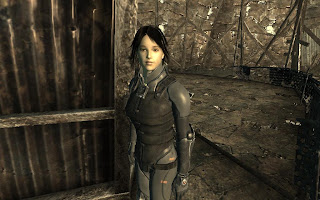

And two of Clover using Chrome Hamster's companion mod:

 What stood out the most to me was the detail of the armours that each of these ladies (and I use the term very loosely in regards to Clover) is wearing. In the year that I have been playing this game, I have never had the textures come through so well on my laptop. This alone made me quite happy. The quality of the faces is also a marked improvement.
Now, before any of you start thinking that this level of quality still isn't the best, I remind you that my laptop's graphics card is an NVIDIA Geo Go 7600: its at least a year older that the FO3 game. This is about as good as it is going to get for me without getting a new computer system.
The next thing I was wondering about, was how will this quality affect one of the editting steps I do. I loaded all four of these shots into my main editor and ran them through the enhancement filter. One of the images of Amy was verging on being washed out. The detail of her face began to disappear. The other three shots had negligable levels of change, so I left all four of them unenhanced. It looks like the improving of the graphic quality has practiacally eliminated the need for me to run the individual screen shots through the enhancement filter. This is good, since that cuts down on the time required to edit the project as a whole.
So after a few attempts to find my FO3 GOTY edition in my rather packed storage unit, I finally found them on Saturday. Now I can play around with the image quality settings of the game, hoping to improve it for The Phoenix Imperative. I have tried changing the settings before, and all I got was CTDs. I thought I would give it a go again and see what happened.
The first thing I changed, was setting the view to "window mode". I thought that having a smaller area for the graphic card to render game resources in would help avoid any more crashes. Next was increasing the quality to "ultra" and crossing my fingers as I started the game.
Well slap me silly! No crashing! And things seemed to be much better looking to my impaired vision (I'm near-sighted). But hey, this could just be my hopeful imagination playing tricks on me, so I started messing around some more with various setting combinations and screen sizes.
Here are four screens I took while messing around in a new game I started. I thought I would explore the Outcast alternative start option in FWE.
Here are two images of Amy Wong:


And two of Clover using Chrome Hamster's companion mod:


Now, before any of you start thinking that this level of quality still isn't the best, I remind you that my laptop's graphics card is an NVIDIA Geo Go 7600: its at least a year older that the FO3 game. This is about as good as it is going to get for me without getting a new computer system.
The next thing I was wondering about, was how will this quality affect one of the editting steps I do. I loaded all four of these shots into my main editor and ran them through the enhancement filter. One of the images of Amy was verging on being washed out. The detail of her face began to disappear. The other three shots had negligable levels of change, so I left all four of them unenhanced. It looks like the improving of the graphic quality has practiacally eliminated the need for me to run the individual screen shots through the enhancement filter. This is good, since that cuts down on the time required to edit the project as a whole.
Subscribe to:
Posts (Atom)